



















How Amplitude handles 400+ security questionnaires a year with a single reviewer
$1.5M+
Annual value delivered
Hours
Per security review, down from weeks
Get the documents and get out. The procurement team wants your documents. Instead of emailing you and bothering your AE they just go and self serve.
Built for GRC, customer trust and sales engineering teams.
Without a trust center, Amplitude's security team asks for a SOC 2 report and the request travels from the account executive to the #security Slack channel, a solutions engineer, the GRC lead and legal before the report reaches Amplitude six days later.
01
They land on trust.yourcompany.com from search or a rep’s link and request whatever sits behind the gate.
02
Requests are matched against Salesforce, so current customers and open opportunities auto-approve. Reusable NDAs carry across documents.
03
It reads from the same knowledge base that answers your security questionnaires, so a renewed SOC 2 changes the public page.
Every domain that pulls your SOC 2 is intent. The verification step a buyer would have stalled on is already done.
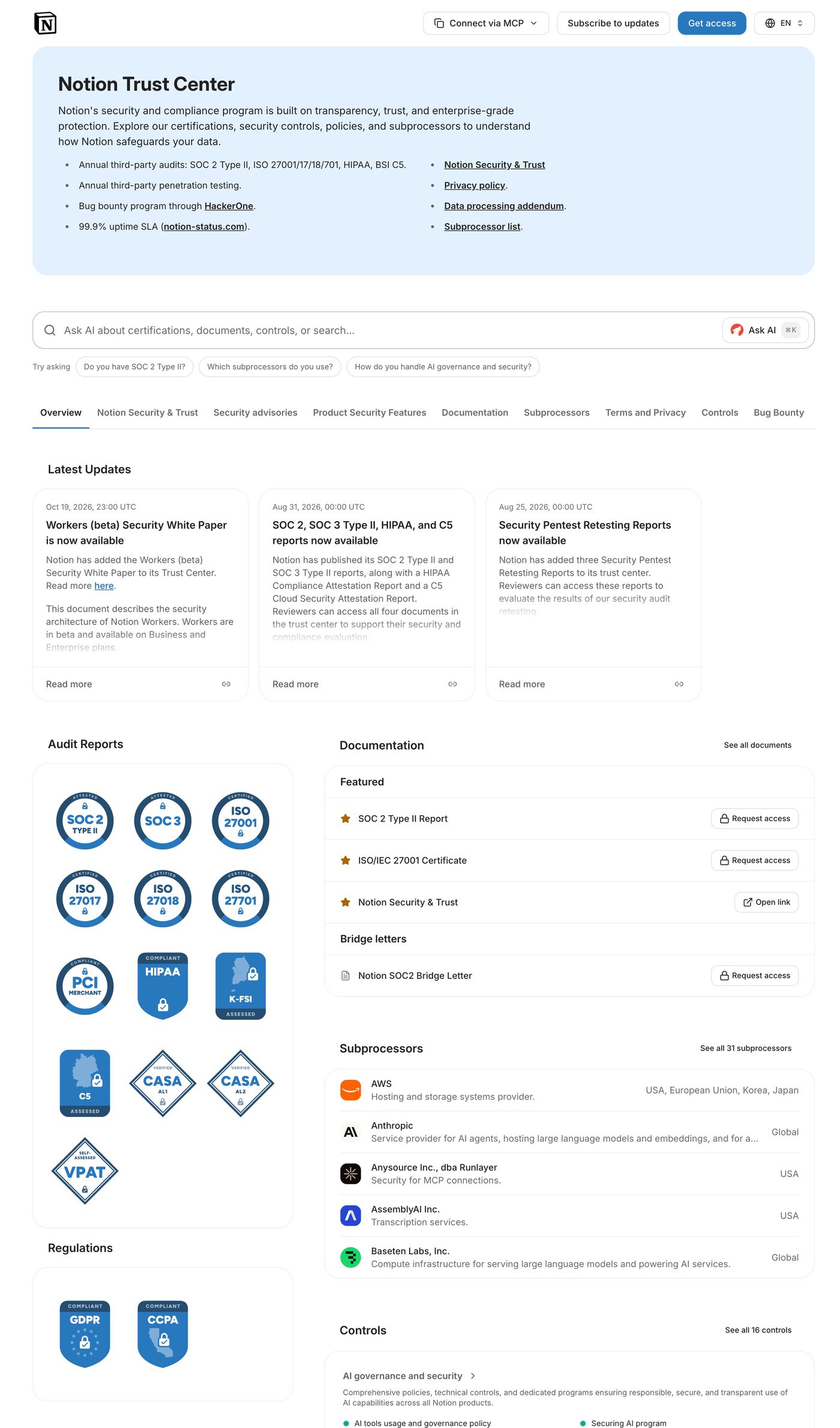
A trust center is a public page where a company publishes its security, privacy, and compliance posture so a buyer can verify it without asking anyone. A trust center is also called a trust portal. It holds your certifications, the reports and policies a reviewer wants to read, the subprocessors you share data with, the controls you operate, and answers to the questions buyers ask most.
Trust center software runs that page for you. It hosts the content on your own domain, decides who sees which document, records what every visitor did, and keeps the page in step with the documentation you already maintain. What it replaces is the loop where a prospect asks a rep for the SOC 2, the rep asks security, and a file goes out over email nobody can trace later.
For the longer definition, including the British English spelling trust centre, read what a trust center is and what belongs on one.
A security reviewer arrives with a checklist. The page does its job by putting the item they came for near the top and releasing it without a conversation.
SOC 2 Type II and ISO 27001 first. Show the certification publicly, release the report through an access request, and group control descriptions by framework.
Penetration test reports, security policies, architecture diagrams. Each document is public or access-controlled, and categories keep a long library navigable.
Privacy reviewers ask for the subprocessor list by name and legal asks for the DPA. Both belong on the page, not in a quarterly email.
Encryption at rest, data residency, retention, incident response. A buyer can also ask the page directly and get an answer drawn from your own documentation.
Post an update when an audit closes or a certification renews, tag it to a category, and notify subscribers now or on a schedule.
Import a Markdown file from GitHub or GitLab and the trust center publishes it. The connection is read-only and every synced change keeps a version history.
Gating is the part teams get wrong most often. The usual setup makes a prospect fill in a form, wait for a human, sign a fresh NDA, and repeat all three for the next document. Wolfia collapses that into one decision per requester.
A visitor requests access with their work email, their company, and a reason. That request is matched against your CRM, so a current customer or an open opportunity in Salesforce auto-approves while everyone else routes to manual review. You set how long access lasts, and an approval emails the requester a unique link.
The NDA is signed once and carries. A reusable NDA covers the whole library rather than one document at a time, so a reviewer who signed for the SOC 2 already has the pen test, and every signature and download lands in the audit log. How security and GRC teams run trust and questionnaires together covers the rest.
The page lives at trust.yourcompany.com or security.yourcompany.com with your logo, your colors, and your copy. You add a CNAME and Wolfia handles the certificate and the CDN, with a dedicated CloudFront distribution per customer domain and no engineering ticket.
Your own domain is also what makes it findable. A buyer searching your company name lands on a page you own rather than a subdomain of a vendor they have never heard of. Juicebox runs its trust center at trust.juicebox.ai and drew 5,000 views in its first two weeks, with security reviews passing five times faster. Amplitude runs theirs at trust.amplitude.com on the knowledge base that answers its questionnaires.
Multiple locales with auto-detected language let an EMEA or APAC reviewer read your posture in their own language, with no translation work on your side.
A stale trust center is worse than no trust center, because a reviewer who finds an expired report stops believing the rest of the page. Pages go stale because somebody has to remember to update them.
Wolfia reads the trust center from the same knowledge base that answers your security questionnaires, so a changed policy or a renewed certification shows on the public page without anyone opening an admin screen. Pages that live in a repository refresh once a day, and you choose whether a merged change publishes straight away or waits for review.
One knowledge base across both surfaces stops the drift customers notice, so your questionnaire automation and your public page answer a retention question the same way.
Every view, download, and link open is recorded against the account and the person where they are known, so you can see which documents get pulled most, which accounts are working through your library, and which domains showed up before sales heard from them. Access requests carry the requester, the company, the reason, and whether the approval was automatic.
You can also see how many requests came in, how many auto-approved, and the average time to a decision. With Salesforce or HubSpot connected, that activity is joined to revenue, so you can rank accounts by open pipeline or by closed-won value. All of it is available over the API, one row per interaction, which is how teams pull it into a warehouse. How marketing teams own the trust surface goes deeper on the pipeline side.
Most teams looking at trust center software already have a page somewhere. The content is usually fine and the problem is the surface it sits on, so the move is a copy exercise.
Wolfia imports a custom page from the content of an existing public web page, or from a Markdown file in a GitHub or GitLab repository, and content is auto-populated from your own site. Customers stand up a trust center and approve it within minutes. Documents, certifications, subprocessors, and control descriptions load once, and the knowledge base keeps them current.
Every trust center demo looks the same, because a page with a logo and a certification grid is not hard to build. The differences turn up in month three.
Marketing, security, and sales teams at B2B SaaS companies that want security to move deals forward instead of stalling them. Wolfia is SOC 2 Type II certified with per-tenant isolation, and our own security posture is published the way yours would be.
A public web page where a company publishes its certifications, security documentation, subprocessors, and controls so a buyer can verify its security posture without asking anyone. Sensitive documents are released through an access request.
SOC 2 Type II and ISO 27001, a penetration test summary, security policies, your subprocessor list, your DPA, control descriptions, answers to common security questions, and an update feed people can subscribe to.
A visitor requests access with their work email, company, and reason, and the request can auto-approve against your CRM. One reusable NDA covers the whole library, and every signature and download is in the audit log.
Yes. It runs at trust.yourcompany.com or security.yourcompany.com with your logo, colors, and copy. You add a CNAME and Wolfia handles the certificate and the CDN.
A security page describes your security in prose. A trust center supplies the evidence a reviewer can request, download, and check. A security page reassures, a trust center verifies.
Wolfia charges no per-seat and no per-viewer fees, so viewers and internal users are unlimited and a custom domain is included at no extra charge. Pricing is scoped on a call around your volume.
Yes. Wolfia imports a custom page from an existing public web page or a Markdown file in GitHub or GitLab, and content is auto-populated from your own site. Documents, certifications, and subprocessors load once and stay current after that.
It reads from the same knowledge base that answers your security questionnaires, so a renewed SOC 2 or a changed subprocessor list updates the public page. Imported pages refresh from their source once a day.
$1.5M+
Annual value delivered
Hours
Per security review, down from weeks


5x
Faster security reviews
Real time
Answers for AEs, down from an end-of-week wait
“The sales team thinks it’s magic. They send in a questionnaire and get responses back the same day.”

Garrett CloseHead of GRC
“In buyer conversations, I show the Wolfia Trust Center more than some of our product features. It’s a critical part of our sales process.”

David PaffenholzCEO & Co-Founder
Wolfia reads your policies where they already live and answers in Slack, the buyer’s portal or the file they sent.
Knowledge sources
 Google Drive
 Notion
 Confluence
 SharePoint
 OneDrive
 GitHub
 GitLab
 Glean
Glean Guru
Guru Slab
Slab Mintlify
 Letter AI
Deal flow
 Salesforce
 HubSpot
 Gong
Gong Clari
Clari Momentum
 Slack
Slack Intercom
Compliance and contracts
 Vanta
Vanta Drata
Drata DocuSign
 Ironclad
 Jira
Jira LinkSquares
 Rippling
 Box
BoxQuestionnaire portals
 OneTrust
 ServiceNow
 SAP Ariba
 Coupa
Coupa ProcessUnity
 Whistic
 UpGuard
 Zip
Zip AuditBoard
 LogicGate
 Drata
Drata Panorays
See Wolfia answer your security questionnaires, RFPs, contract redlines and trust center requests. Unlimited seats and outcome-based pricing.
Book a demo